THREE DIFFERENT STEPS.
Getting Pirate Shop Access does not start a claim on this website. A chest reward, activation and claiming an item are three separate actions inside Fortnite.
Receive the reward
Read the treasure notification and check the correct Epic account.
Find the reward routeActivate Access
Review the deadline and terms. Activation starts the 14-day period.
See the activation screensClaim an offer
Open an eligible offer, confirm its claim and check your Locker.
Check which offers qualifyIf you have only seen someone else’s reward or a community screenshot, you have not verified Access on your own account. Start with your own reward and Shop screens.
OPEN CHESTS.
READ THE REWARD.
VGC describes Access as a rare chest reward in seasonal Battle Royale and Zero Build. Its listed sources include ordinary, rare, Sprite and buried chests. It is awarded by a treasure notification, rather than a loose token you must pick up.
Source: VGC’s Pirate Shop Access guide.
Enter the seasonal island
Choose Battle Royale or Zero Build and read the current lobby announcement. Use the playlist named for the event. A Creative map with “token” in its title is not an account redemption service.
Open eligible chests along your route
Use a route you can survive. If you want Sprite finds as well, follow a Wanted Poster map to its buried chest. See what to look for.
Read any treasure notification
Check the reward name. A Gizmo, loading screen or Sprite is a different find. After returning to the lobby, open Shop on the same account and look for Pirate Shop Access.
No token after a session can be a normal random outcome. Set a time budget before playing; the published odds do not provide a personal “nearly there” meter.
FROM ACCESS
TO YOUR FIRST CLAIM.
1. Find the Pirate Shop panel
Open Fortnite’s Shop. In this example, the Pirate Shop status sits at the lower right, apart from the offer tiles. An active status and a prompt to activate represent different stages.
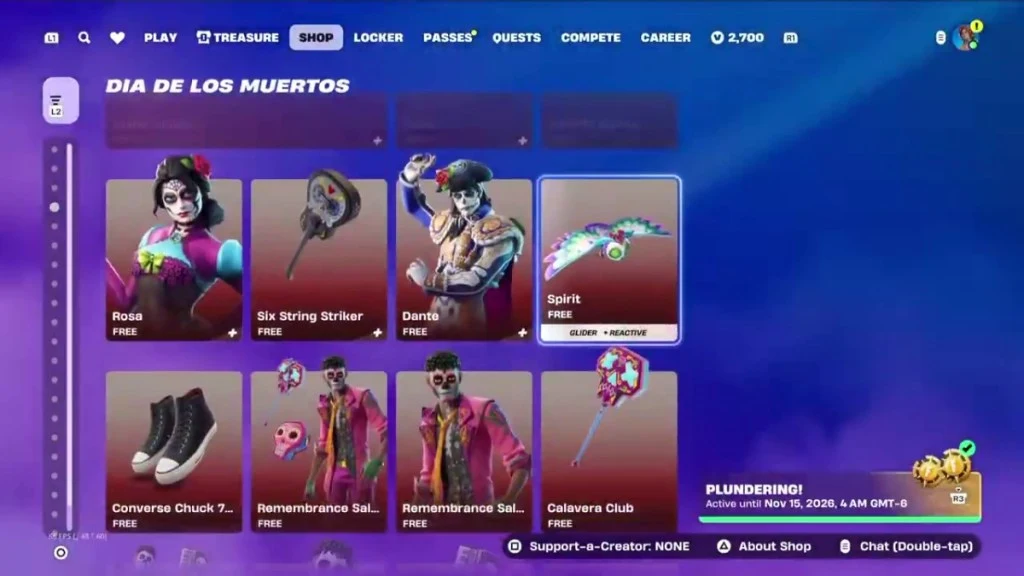
2. Review before selecting Activate Now
Read the deadline, the 14-day duration and item exclusions. Check that you are on the account that received Access. If you prefer a later set of Shop rotations, compare that plan with the activation deadline before waiting.
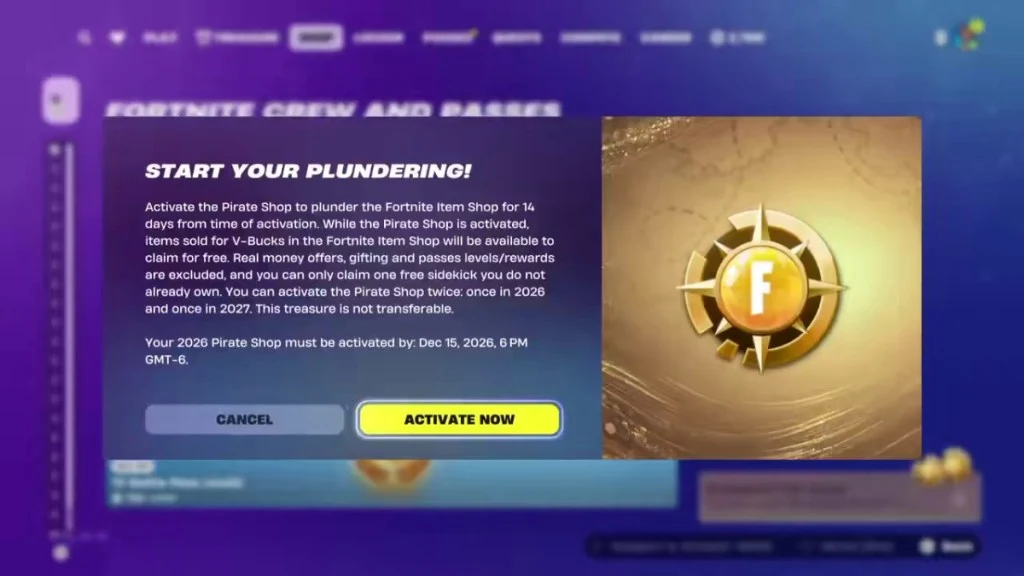
3. Open an eligible item and confirm its claim
Look at the price and claim action on the offer itself. Read its confirmation before accepting. Then check your Locker for the item you selected. Access does not automatically collect every offer that rotates through the Shop.
Return during the active period if there are later offers you want to inspect. The timer continues while you are away. Your in-game panel is the place to verify the remaining time.
Source: Beebom’s illustrated Shop walkthrough.
Before you start the clock
- Confirm the Epic account and the Access reward.
- Read your exact activation deadline.
- Review today’s offers and any item restrictions.
- Choose a period when you can check the Shop again.
WHAT ACCESS COVERS.
Review for a free claim
Eligible current V-Bucks Shop offers during your active period. Open each offer to confirm its available action.
Excluded or limited
Real-money offers, gifting and pass levels/rewards are excluded. Only one previously unowned Sidekick can be claimed.
VGC reports separate 2026 and 2027 activations. The 2026 example ends on 15 December. Follow your account’s exact deadline; reports disagree on some future-window details.
Source: VGC’s activation windows and exclusions.
A timing example
Illustration, not an account forecast: you receive Access on day A and activate on day B. The 14-day claim period begins at B. Waiting between A and B does not extend the activation deadline.
- Reward received: check that Access is present.
- Before activation: compare offers and the deadline.
- Activation: the claim timer begins.
- Active period: claim eligible offers as they rotate.
- End: check the expiry message; this site cannot extend it.
WHAT THE ODDS
ACTUALLY MEAN.
Epic publishes a base chance of 1 in 137,500 per chest for Access, and a 1.5× Treasure Hours baseline boost. Rates outside Treasure Hours do not vary by time of day. Future event boosts can be higher; this is not confirmation of the next session’s modifier.
Source: Epic’s official chest drop-rate table.
At that Hours baseline, 100 independent rolls have about a 0.1090% modelled chance of at least one reward. The chance of no reward is still about 99.8910%. A boost makes a rare event less rare; it does not turn a short run into a likely win.
What does that mean for a run?
Explore a hypothetical number of eligible chest rolls. This is a probability model, not a progress bar.
0.1090%
Modelled chance of at least one Access reward in 100 independent rolls at 1.5×.
Assumes independent rolls at the same rate before an Access reward: 1 − (1 − p)n. It does not simulate squad sharing, duplicate protection or account eligibility. Previous misses do not make the next chest a guaranteed win.
What about other treasure rewards?
| Treasure | Per chest | Hours baseline |
|---|---|---|
| Weekly Gold Outfit | 1 in 1,562,500 | 7.5× |
| Weekly Vehicle & Decal | 1 in 7,813 | 10× |
| Weekly Pickaxe or Back Bling | 1 in 568 | No boost listed |
| Weekly Jam Track | 1 in 391 | No boost listed |
| Weekly Loading Screen | 1 in 272 | No boost listed |
| Any Gizmo | 1 in 127 | No boost listed |
Epic says the same treasure cannot be earned twice, except Gizmos. “No boost listed” does not mean an item cannot drop.
This is a stated independent-roll model before a reward. It does not know which rewards your account already owns. Check game announcements for current eligibility and session-specific changes.
FIND YOUR
RECOVERY STEP.
No drop is not proof of a fault
Compare your expectation with the published odds. This site cannot inspect your account or identify a winning chest.
Read all recovery steps without the selector
- No treasure notification
- Review the mode and published chance. Do not confuse a missing random reward with a missing activation.
- Notification seen, Access missing
- Note the reward name, match time and the account used. Reopen the lobby and Shop. If the prompt stays missing, send those details to Epic support.
- Offer still has a price
- Check the active timer, account and exclusions. Read the offer’s own action before proceeding.
- Time or activation deadline ended
- Read the expiry message. Only Epic can review an account-specific dispute; this site cannot renew Access.
- Login or matchmaking fails
- Check Epic’s Fortnite service components, then the client update and playlist.
For support, record what happened and when. Do not email us a password, recovery code or payment information. Account rewards belong with Epic’s Fortnite support.
BEFORE ANOTHER RUN.
Can I get Access outside Treasure Hours?
Yes. Epic publishes normal-match chest odds as well as the event boost. The event window changes the published rate; it is not the only time Access can drop.
Will buying a skin improve my chance?
No skin-based multiplier is documented in the sources reviewed here. The official table describes chest reward rates. Do not spend money expecting it to improve this model.
Does a squad reward settle every player’s case?
VGC reports squad sharing for Access. Check each player’s reward screen. The reviewed sources do not establish every disconnect or early-leave condition.
Can this site activate or claim it for me?
No. Use Fortnite’s Shop. FN Power Hour never asks for an Epic login or recovery code.
Recognize posters, decide your objective and build a route sheet with an exit plan.