
YOUR MONDAY.
YOUR SPRITE GOAL.
Choose a Sprite for 2× XP and Dust, then start its checklist.
Mon 23 Nov 2026
Coordinated Universal Time · UTC
9 AM Eastern Time · season-rule start.
Change Monday or city
Search a city or time-zone name.
UTC reference · enable JavaScript for your device time zone.
Browse all time zones
Choose your Sprite goal
Choose a Sprite to follow its three steps in Focus. Check each step during your run.
60-minute play budget · change it below.
Set a play budget and save your Monday plan.

Play time, squad & calendar
Read or manually copy the squad plan
Enable JavaScript to build a plan from your chosen Monday and city.
A calendar for your personal run
Covers meetup through your planned finish. Google opens an unsaved draft. Open and save the ICS file in your calendar app; its alert is 15 minutes before meetup. Update saved events in your calendar app after schedule changes.
Read or save the calendar text
When a download is unavailable, copy this text into a plain-text file ending in .ics, then open it in your calendar app.
Keep your Sprite target checklist and verify progress in Fortnite. Storage and privacy.
Review your Sprite checklist
Review the results shown in Fortnite. Save adds your selected checks to this Sprite’s notes.
Not saved. Copy this full Sprite backup into a .json file before leaving; restore it using the Sprite checklist’s backup tool.
23 November 2026 start times around the world
| City | Local date | Start |
|---|---|---|
| Los Angeles | Mon 23 Nov 2026 | 6:00 AM PST |
| New York | Mon 23 Nov 2026 | 9:00 AM EST |
| London | Mon 23 Nov 2026 | 2:00 PM GMT |
| Berlin | Mon 23 Nov 2026 | 3:00 PM GMT+1 |
| Shanghai / Beijing | Mon 23 Nov 2026 | 10:00 PM GMT+8 |
| Sydney | Tue 24 Nov 2026 | 1:00 AM GMT+11 |
Sydney reaches Tuesday before the same Monday event starts. An event name and your local weekday can differ.
Start rule: Epic’s Treasure Hunters announcement. Check the current lobby notice before playing. The calendar above reserves your personal meetup and play budget.
SPRITE PROGRESS.
THREE THINGS TO CHECK.
- 2× Sprite XP
- Use the window to build Sprite progress on the helper you intend to keep or master.
- 2× Sprite Dust
- Epic names a separate Dust bonus. Complete extraction and check the amount awarded.
- More Sprite Chests and Wanted Posters
- The season notes describe more Sprite-finding opportunities through extra Sprite Chests and Wanted Posters.
Individual actions can have different XP changes. The 9 November community report lists elimination XP rising from 300 to 400 and container XP from 75 to 150. Read these figures as observations from the 9 November edition.
Season bonuses: Epic’s Mastery Monday rules. For variant boosts and daily challenges, read the current quest values.
CHOOSE. LEVEL.
EXTRACT. CHECK.
Use these steps to prepare one Sprite goal and your personal play budget.
Choose the Sprite and the goal
Keep a collection or Mastery checklist. Compare your collection first and choose one missing result. The Sprite guide also explains abilities and variants.
Equip it and build progress
Keep the intended helper equipped and read its current level and ability. Follow the match’s actual Sprite Chests or Wanted Poster opportunities. If your aim is Mastery, confirm the MAX LEVEL indicator before extracting.
Finish the extraction
At a fixed site, use the call control, wait for the crate, deposit the intended Sprite and wait for success feedback. An available Portable Extractor is a separate option; follow its current prompt. Reserve time for the storm, travel and contested sites.
Return to the lobby and check the crown
Check the Sprite tab for permanent Mastery, then review Treasure → Mastery for reward requirements and claim state. Mark your browser checklist only after checking the result in Fortnite.
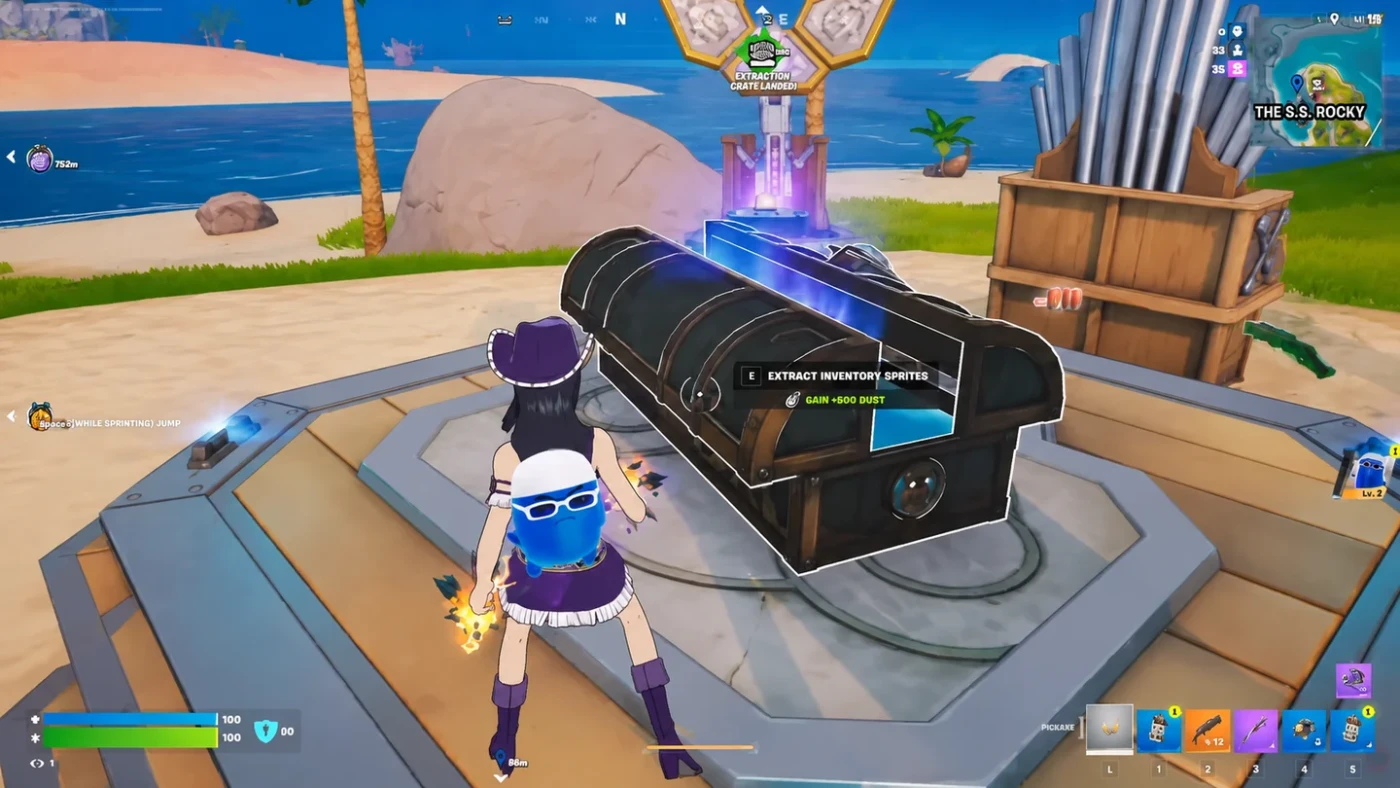
Read the full illustrated extraction steps
Collection and max-level extraction: Epic’s core Sprite rules. Permanent crown: Epic support.
PICK THE NEXT
MASTERY RESULT.
Mastery is permanent progress, while the helper’s current level can reset after it is lost. Epic identifies the crown as the permanent record. A full level bar and a crown are different checks.
Start with the 7, 18 and 40 Mastery reward checkpoints, then read the dated Page 3 reward table and community screenshot for milestones at 13, 14, 15, 16 and 18 mastered Sprites. Read your account’s visible track; those milestones count mastered Sprites.
Before queueing, agree which helper you are working on and one extraction fallback. After the run, correct the personal note if the deposit failed or the expected crown is absent.
Mastery permanence: Epic support. Reward-track location: Epic’s season notes.
RECENT REPORTS.
CHECK THE DATE.
Recent Monday reports on X · checked 15 November
On 9 November, FNAssist reported extra Sprite Chests and Wanted Posters, increased Sprite XP and extraction Dust, and daily challenges awarding a Portable Extractor at 15 and 20 Sprite extractions. Check your current quests before choosing a target; use the dated report alongside the current quest list.
The same report lists different XP increases for individual actions: elimination XP rose from 300 to 400, while container XP rose from 75 to 150. Use these action-specific values when comparing the reported bonus.
Fortnite Status acknowledged missing bonuses on 2 November. Check the current lobby notice and status updates if your match’s progress differs. Your selected Monday plan uses the published season rule.
Mastery Monday not working?
- Check the local date and start. The season rule starts at Monday 9 AM US Eastern Time. In November 2026, that is 2 PM GMT in the UK and 3 PM CET in central Europe. Use the city converter above for your date.
- Check the right progress. Look for Sprite XP and Sprite Dust. Account XP, a Pirate Token and a permanent Mastery crown are different outcomes. A crown still requires the maximum-level extraction process.
- Check the current playlist and services. Read the in-game event notice and Epic’s Fortnite status.
- Record a repeatable mismatch. Note the platform, playlist, Sprite, local time and progress before/after. On Xbox or any other platform, use Epic’s in-game bug report if the expected progress is absent.
Does Mastery Monday last 24 hours or work in bot lobbies?
Epic’s season announcement describes Monday bonuses from 9 AM Eastern Time through the day. Use the converted start above and read the lobby notice for your playlist and edition.
MASTERY MONDAY
QUESTIONS.
What time does Mastery Monday end?
Epic’s season notes give a Monday 9 AM Eastern start and describe the bonuses as all day. They do not publish an exact end timestamp. The calendar above covers your own play budget.
Is Mastery Monday the same as Power Hour?
They are separate activities in this season. Mastery Monday targets Sprite progress. Treasure Hours / Power Hour uses its own dated sessions and modifiers. Read each event’s own bonus list.
Does double Sprite XP mean double Battle Pass XP?
The seasonal announcement names Sprite XP. Battle Pass and quest rewards have their own listed XP values.
Can I use this planner after the listed start?
This planner reserves a run at a listed start. Once that start passes, it keeps the selected date visible and disables new reminders for it. You can still read the guide and keep Sprite notes; check the game for the current event state. Another listed Monday must be chosen explicitly.
How do I save my plan and calendar reminder?
Save keeps your choices in this browser. Google Calendar opens a draft. Review and save the draft, or open and save the downloaded ICS file in your calendar app.
SOURCES AND
THE NEXT UPDATE.
- Epic season announcement: Monday start rule and seasonal Sprite bonuses.
- Epic core Sprite rules and Mastery support: extraction, permanent Mastery and level resets.
- FNAssist, 9 November: community observations of that Monday’s rates and challenges.
- Fortnite Status, 2 November: the bonus issue reported for that date.
Season rule checked 19 November 2026; dated community reports checked 15 November. The start and bonuses above follow Epic’s published season rule. The 2 and 9 November reports describe those dated editions; check the current lobby notice for today’s challenges and any changes.
Compare the activity calendar · Return to the Sprite guide · Report a source-backed correction.