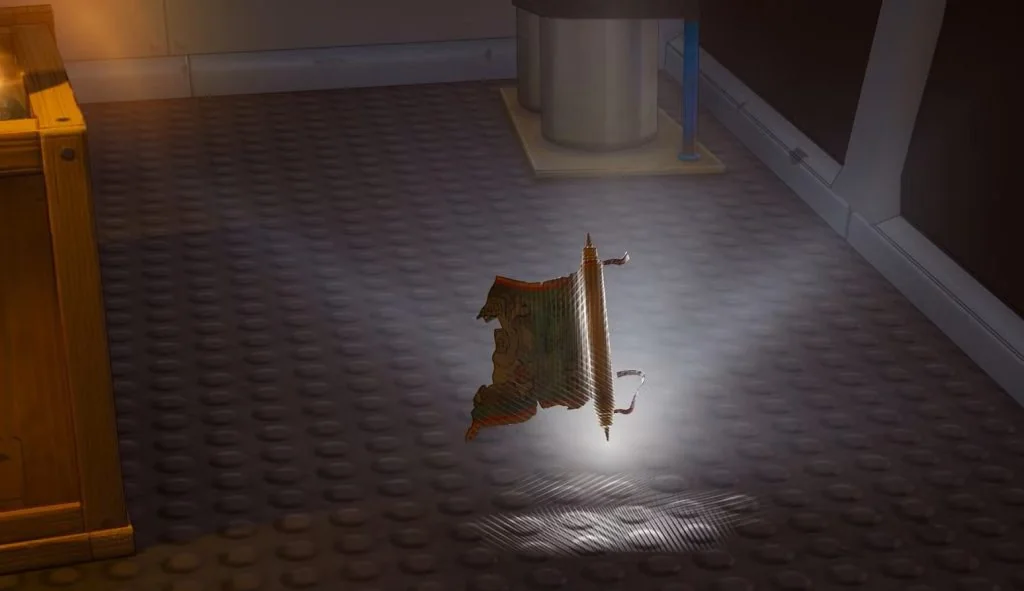
MAP FRAGMENT
LOCATIONS & LOG.
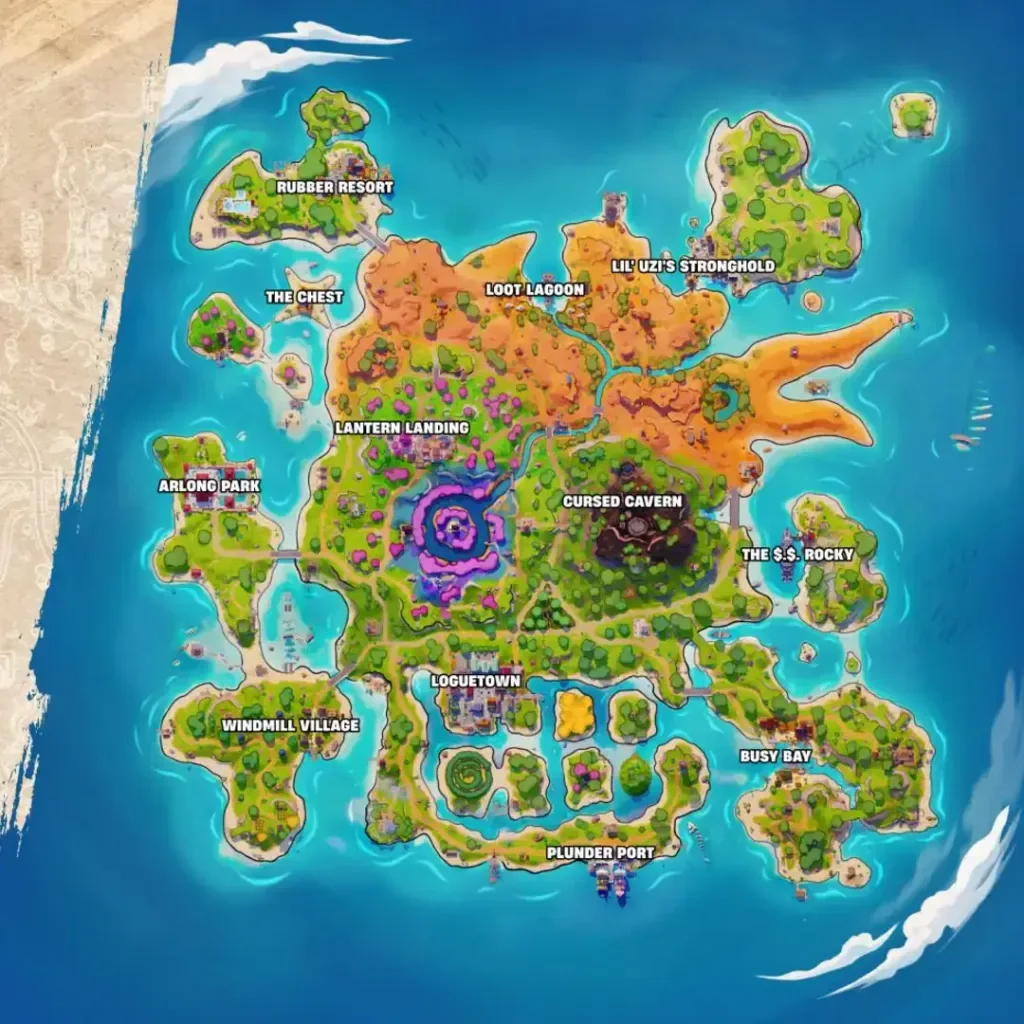
The first piece is on The $.$. Rocky’s lowest interior level. The second is in a small shack on the southeast edge of Lil’ Uzi’s Stronghold. The third lies under a tree opposite Crusty Cod at Friendship Villa.
Routes: The Click’s first-piece guide, second-piece guide and the pictured walkthroughs below.
Third piece: follow the Friendship Villa tree route. The outdoor pickup has its own location and quest check. Captain’s Day arrival details.
Personal fragment checklist
Clear the six marks in this browser? Export a backup or copy a note first if you want to keep your record.
Back up or restore my checklist
Save a JSON file to move these manual marks to another browser. Restoring replaces the six marks only after you review and confirm.
View or manually copy my progress note
Save the text wherever you keep notes. To restore these marks on another browser, use the JSON backup above.
LOCATE YOUR
MISSING PIECE.
A location is only the first step
- Before queueing: read the current Treasure → Adventure and Quests screens for your missing piece.
- In the match: reach the named area, then follow the relevant floor or building instructions.
- Near the object: use the displayed interaction prompt and read the quest update.
See Friendship Villa on the Piece 3 map.
The personal checklist can help you plan your next visit. Use the active Adventure quest and current island map to choose your next pickup.
Plan a route with a backupPIECE 1.
ROCKY’S LOWER DECK.
The $.$. Rocky → middle main room → lowest storage room → rolled floor pickup.
External walkthrough reviewed · . Sources and room references.
Walk the ship in Focus
Focus remembers which deck step you reached and keeps a personal timer you can pause. Mark Piece 1 only after quest credit.
Enable JavaScript for saved Focus steps. The complete walkthrough stays readable below.
Locate The $.$. Rocky
In Treasure Hunters Battle Royale or Zero Build, check Treasure → Adventure and your Quests for the missing ship piece. On the island map, find The $.$. Rocky on the eastern coast and approach the battleship.
- Look for
- The $.$. Rocky label and the grey battleship.
- Check before continuing
- You have identified the named ship in the current match.
Early-season Crossbones Isle map showing The $.$. Rocky on the eastern coast. Island reference: Epic Games, via The Click. Select to enlarge; use Back to return to this step. Can’t complete this step?
If the POI or quest is different, check the current mode and quest before travelling. Leave an unsafe landing for another attempt.
Enter the middle room and go down
Use the main room around the middle of the ship, then take an accessible stairway down to the lowest interior level. The reviewed walkthrough also describes breaking through an outside hull wall or a deck when the stairs are hard to find.
- Look for
- The diamond exclamation marker; a marker below you means you still need to descend.
- Check before continuing
- You are inside the lowest storage room, with canisters and a crate beside the hull.
Can’t complete this step?
Do not keep circling an upper deck. Recheck the marker’s height and look for a safe way down; stop if the storm or another team blocks entry.
Find the rolled floor collectible
Look beside the crate and metal canister near the hull. Approach the glowing rolled map on the floor until Gather Map Fragment appears. A nearby chest or boss drop is a different object.
- Look for
- The rolled map and Gather Map Fragment prompt shown in the screenshot.
- Check before continuing
- The interaction prompt names the map fragment.
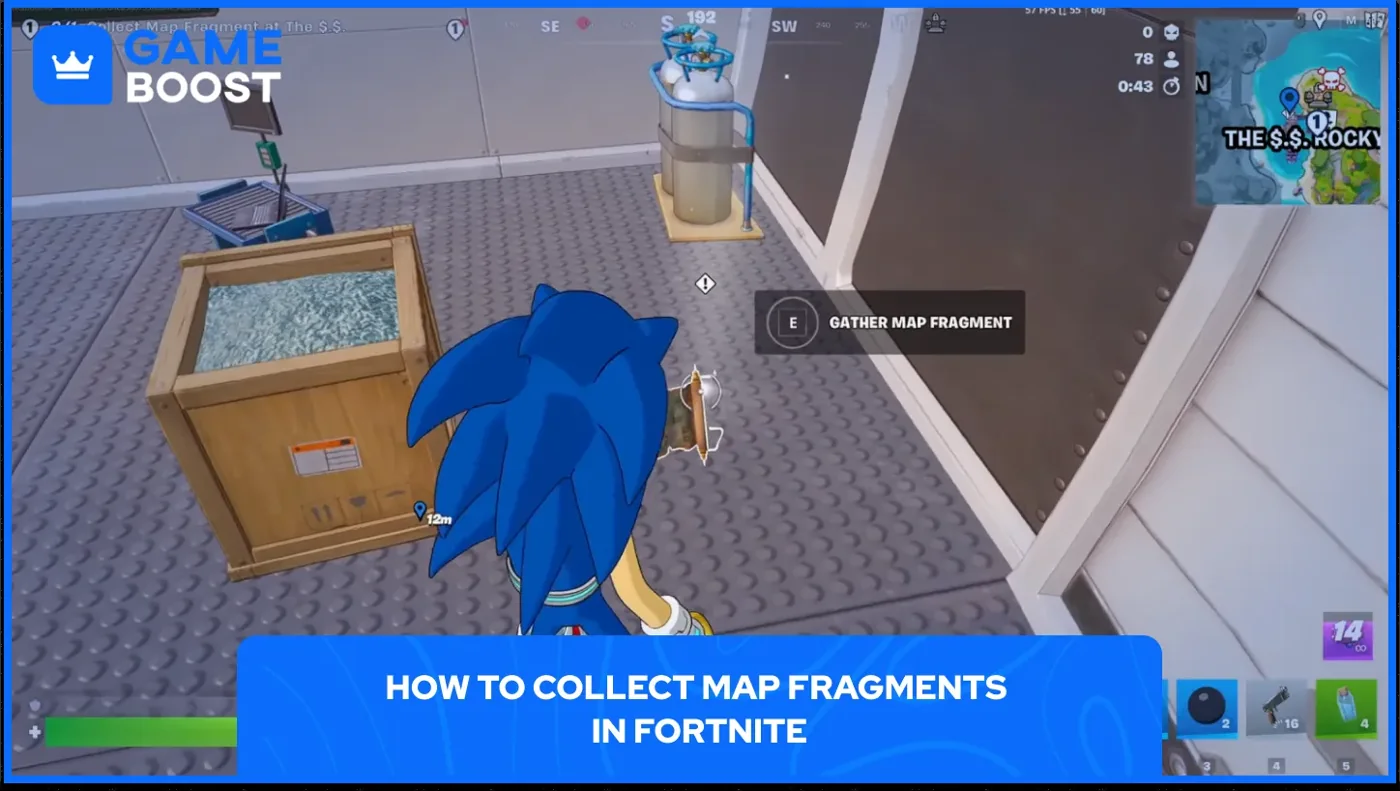
The crate, metal canister and floor prompt identify the pickup room. The displayed keyboard binding is an example. Pickup screenshot: Epic Games, via GameBoost. Select to enlarge; use Back to return to this step. Can’t complete this step?
If nothing appears, recheck the lowest level and your completed quests. Recheck the quest and floor pickup before choosing your next route.
Gather, then verify quest credit
Use the interaction key or button shown by your game. Read the quest update or open Quests to check that the ship objective advanced. Only then mark Piece 1 in your manual checklist.
- Look for
- Your current quest objective and collection counter after the interaction.
- Check before continuing
- Fortnite shows the ship objective credited. Record the piece after reading that quest update.
Can’t complete this step?
If there is no credit, keep the web checkbox clear. Recheck the object, mode and quest before recording completion.
Route evidence: GAMES.GG · entry and lower room · The Click · first fragment · GameBoost · pickup prompt. Sources checked 15 November 2026. Use the lowest level, pictured containers and quest marker to identify the room. Source screenshots illustrate the pickup room and interaction prompt.
Check my Piece 1 recordRead the Adventure quest result, then update the Piece 1 box.
PIECE 2.
UZI’S SHACK.
The second Map Fragment is inside a small one-door wooden shack at the south-east edge of Lil' Uzi's Stronghold, just north of a small tower. The scroll glows on the floor inside.
External walkthrough reviewed · . Route and image sources.
Walk the shack route in Focus
Your Stronghold step, budget and paused time stay saved in this browser. Check the Stronghold quest before recording Piece 2.
Enable JavaScript for saved Focus steps. Read the complete route below.
Check your Quest and go to Lil' Uzi's Stronghold
Open Quests and find Collect Map Fragment at Lil' Uzi's Stronghold. Then head to Lil' Uzi's Stronghold.
- Look for
- The Lil' Uzi's Stronghold label on the map.
- Check before continuing
- The quest is in your list and you are at Lil' Uzi's Stronghold.
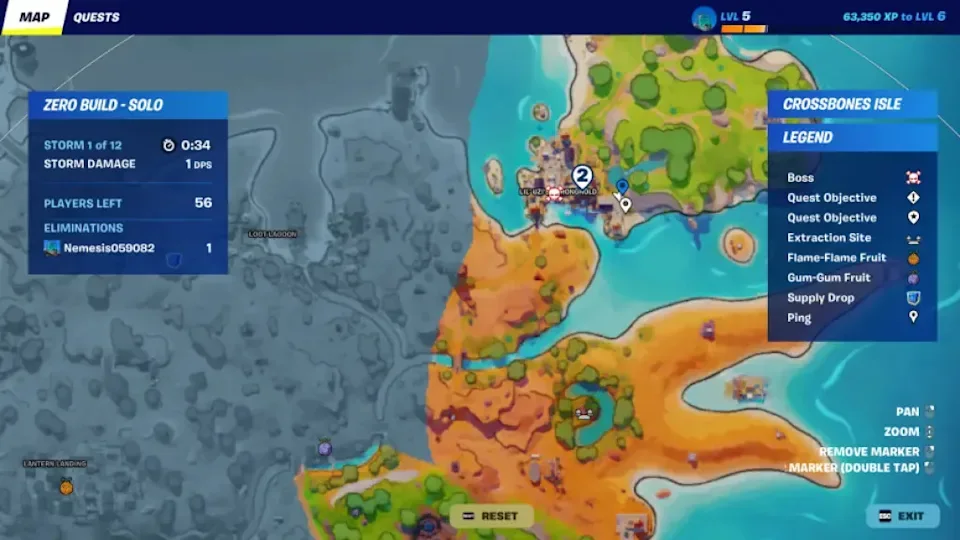
Lil' Uzi's Stronghold on the source player's map. The blue pin is that player's marker. Stronghold map frame: Epic Games; screenshot by Destructoid (Arka Sarkar), via Yahoo, 8 November 2026. Select to enlarge; use Back to return to this step. Can’t complete this step?
If the quest is missing, review your completed Quests and the current Adventure list before travelling. Record Piece 2 only after checking that objective on your account.
Find the one-door shack north of the small tower
Go to the south-east edge of the Stronghold. Find the small tower, then look just north of it.
- Look for
- A small wooden shack with a single door. The reference image shows a light-coloured door and a white diamond ! nearby.
- Check before continuing
- You are at the shack's door.
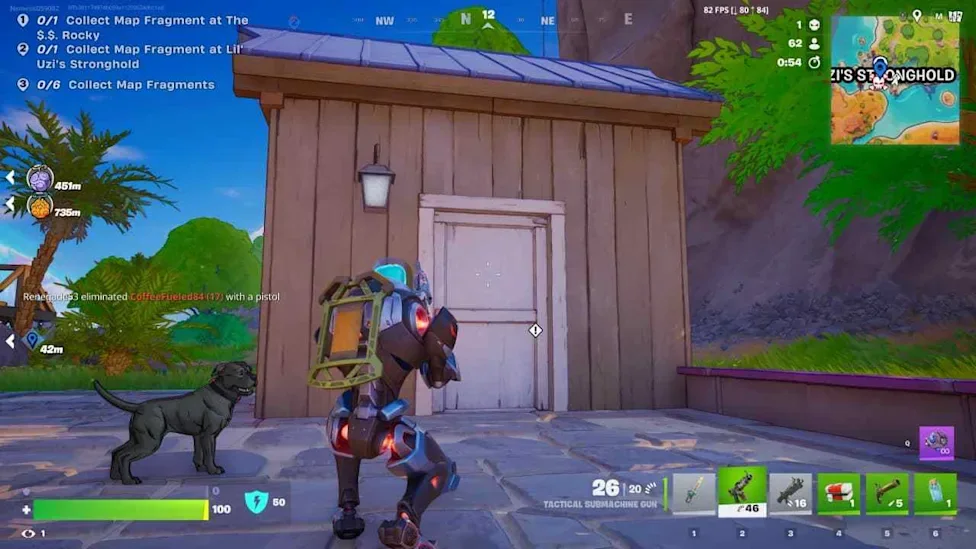
The single-door shack. Before pickup, the source player's Stronghold task is 0/1 and fragment total is 0/6. Shack door frame: Epic Games; screenshot by Destructoid (Arka Sarkar), via Yahoo, 8 November 2026. Select to enlarge; use Back to return to this step. See the shack beside the stone tower
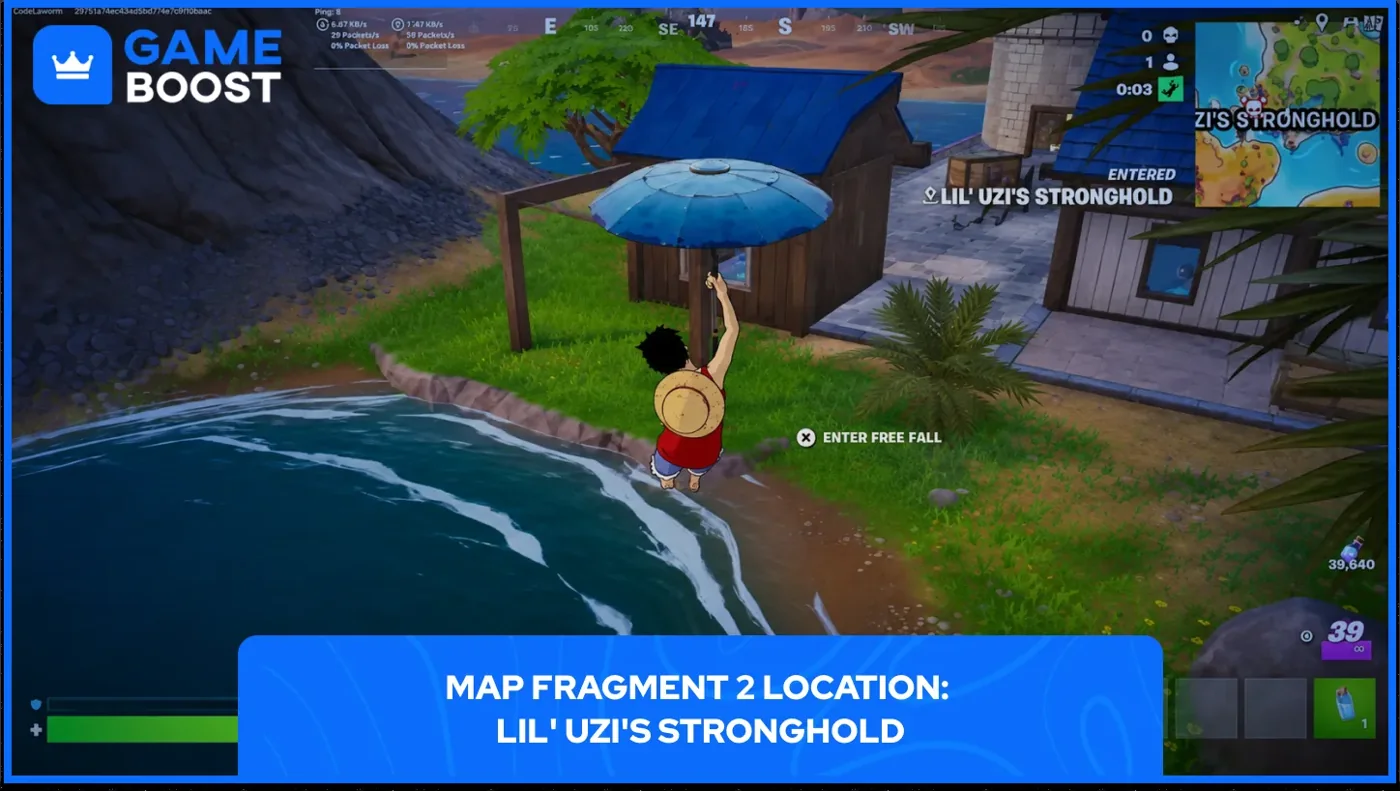
Approach from the water: the wooden shack and nearby stone tower. Epic Games, via GameBoost. Select to enlarge; use Back to return to this step. Can’t complete this step?
If you see no shack, recheck the south-east edge. Find the small tower again, then go due north of it.
Go inside and interact with the floor scroll
Open the door and go inside. Look at the floor by the wall. When the prompt appears, use the interact button shown on your screen.
- Look for
- Wooden plank walls, a rope net and a window. A glowing scroll lies on the floor nearby, with a diamond ! and the Gather Map Fragment prompt.
- Check before continuing
- The interaction finishes and your quest updates.
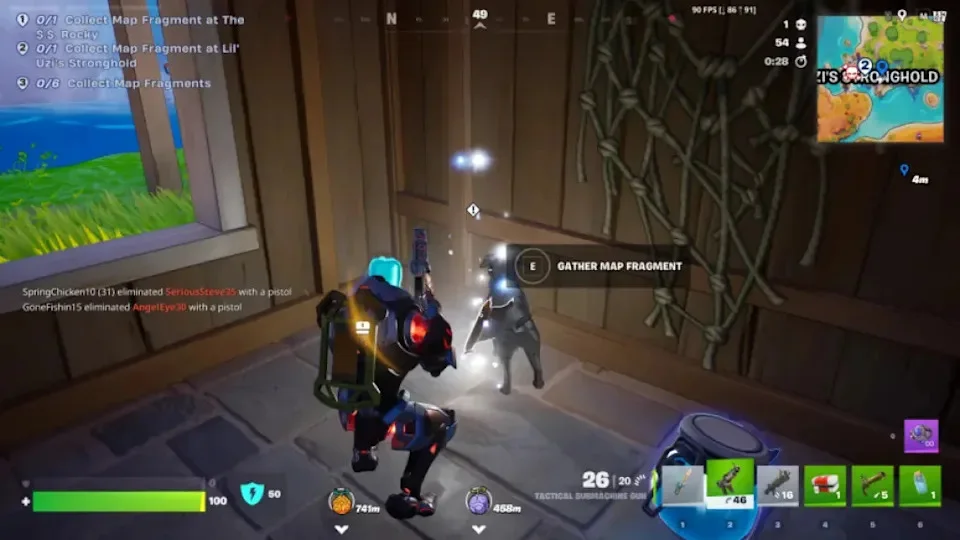
Inside the shack: the floor scroll, hanging net and Gather Map Fragment prompt. The source player's 0/1 task and 0/6 total are before pickup; E is their displayed key. Floor scroll frame before pickup: Epic Games; screenshot by Destructoid (Arka Sarkar), via Yahoo, 8 November 2026. Select to enlarge; use Back to return to this step. Can’t complete this step?
If no prompt appears, move closer to the glowing floor spot. Follow the prompt on your own screen until the action completes.
Check the quest, then tick Piece 2
Open Quests and check Collect Map Fragment at Lil' Uzi's Stronghold. When that task shows complete, return to the site and tick Piece 2 yourself.
- Look for
- Collect Map Fragment at Lil' Uzi's Stronghold marked complete in your Quests.
- Check before continuing
- Your own Quests show that task as complete. Tick Piece 2 on the checklist.
Can’t complete this step?
If Collect Map Fragment at Lil' Uzi's Stronghold is not complete, recheck the pickup. Leave Piece 2 unticked until it is.
The pickup or task is missing
Can't find Collect Map Fragment at Lil' Uzi's Stronghold? Check your Quests tab. It may already be complete, or not available to you yet. Don't tick Piece 2 until your own quest shows it done.
Pickup didn't register? Open Quests and check Collect Map Fragment at Lil' Uzi's Stronghold. If it isn't complete, go back to the floor scroll and use the prompt on your screen again. Keep Piece 2 unticked until the quest is complete.
Steps 1–2: The Click · tower and shack directions · TimeSaver · tower and shack text · Destructoid via Yahoo · map, door and pickup images. Step 3: Destructoid via Yahoo · map, door and pickup images. Step 4: Destructoid · floor pickup and quest update · Destructoid via Yahoo · map, door and pickup images. Additional sources: Epic · second-fragment arrival. Sources checked 16 November 2026. The pickup frames show the source player before collecting the scroll.
Check my Piece 2 recordCheck the Stronghold objective in Fortnite, then use the checklist to save Piece 2.
PIECE 3.
FRIENDSHIP VILLA.
The third Map Fragment is at Friendship Villa, in the northwest of the map. Look on the grass by a tree at the base of the building opposite Crusty Cod.
External walkthrough reviewed · . Route and image sources.
Walk the villa route in Focus
Pause the timer before leaving to keep the time you have left. Reopen Focus to resume your saved Villa step. Check the quest result before recording Piece 3.
Enable JavaScript for saved Focus steps. Read the complete route below.
Check your Quest and head to Friendship Villa
Open Quests and find Collect Map Fragment at Friendship Villa. Then open the map and go to Friendship Villa in the northwest.
- Look for
- The Friendship Villa label on the map's northwest side.
- Check before continuing
- The quest is active and you are inside Friendship Villa.
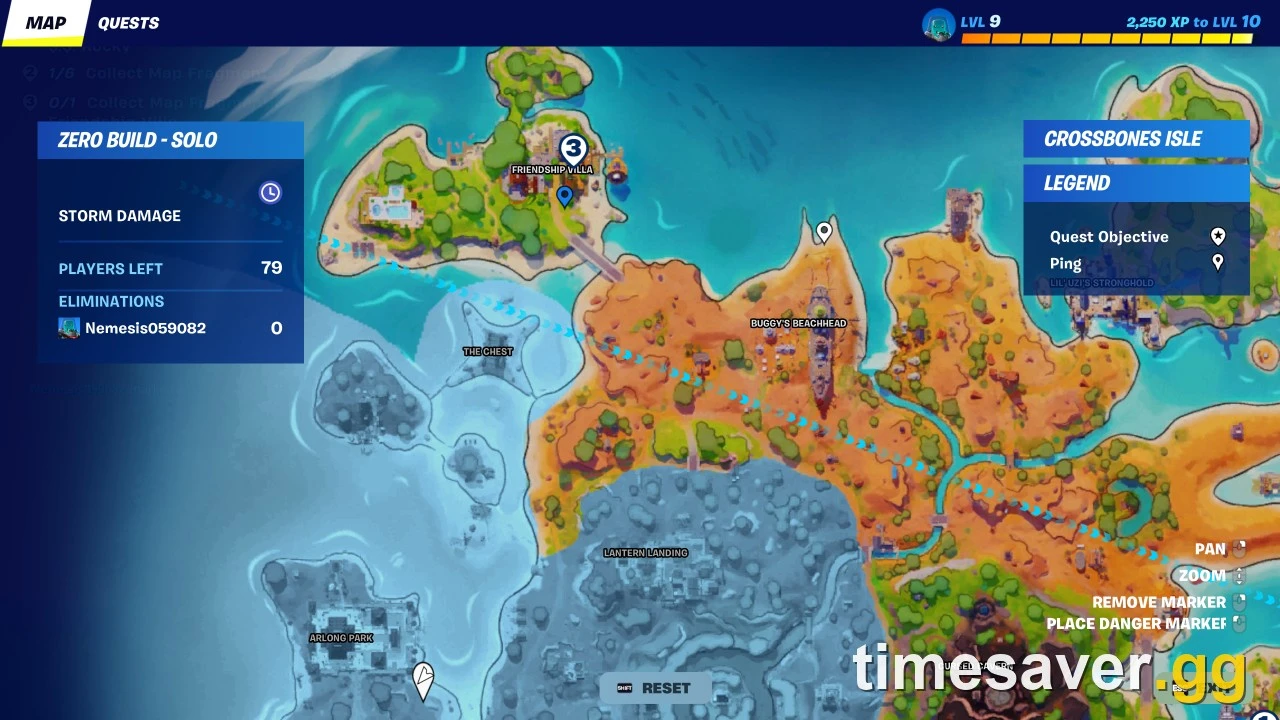
Friendship Villa is on the northwest island. The blue pin is the source player’s marker. Game map: Epic Games, via TimeSaver. Select to enlarge; use Back to return to this step. Can’t complete this step?
If the objective is locked or missing, read any prerequisite or unlock time shown in Quests before travelling. If it is already complete, use that result to review your Piece 3 record.
Find the tree opposite Crusty Cod
Find Crusty Cod. Then go to the building opposite it and look for a tree at its base.
- Look for
- Outdoor grass beside a wooden fence, with yellow-green bushes nearby. Use these to confirm you have the right spot.
- Check before continuing
- You are standing on the grass by the tree, next to the fence and bushes.
Can’t complete this step?
If you can't find it, go back to Crusty Cod. Check again which building is opposite it, then look for the grass under the tree, the wooden fence and the yellow-green bushes.
Spot the scroll and interact
Walk up to the glowing scroll in the grass. When the diamond ! and the Gather Map Fragment prompt appear, press the interact button shown on your screen.
- Look for
- A glowing scroll lying on the ground, a diamond ! marker, and the Gather Map Fragment prompt.
- Check before continuing
- The pickup action goes through and the objective updates.
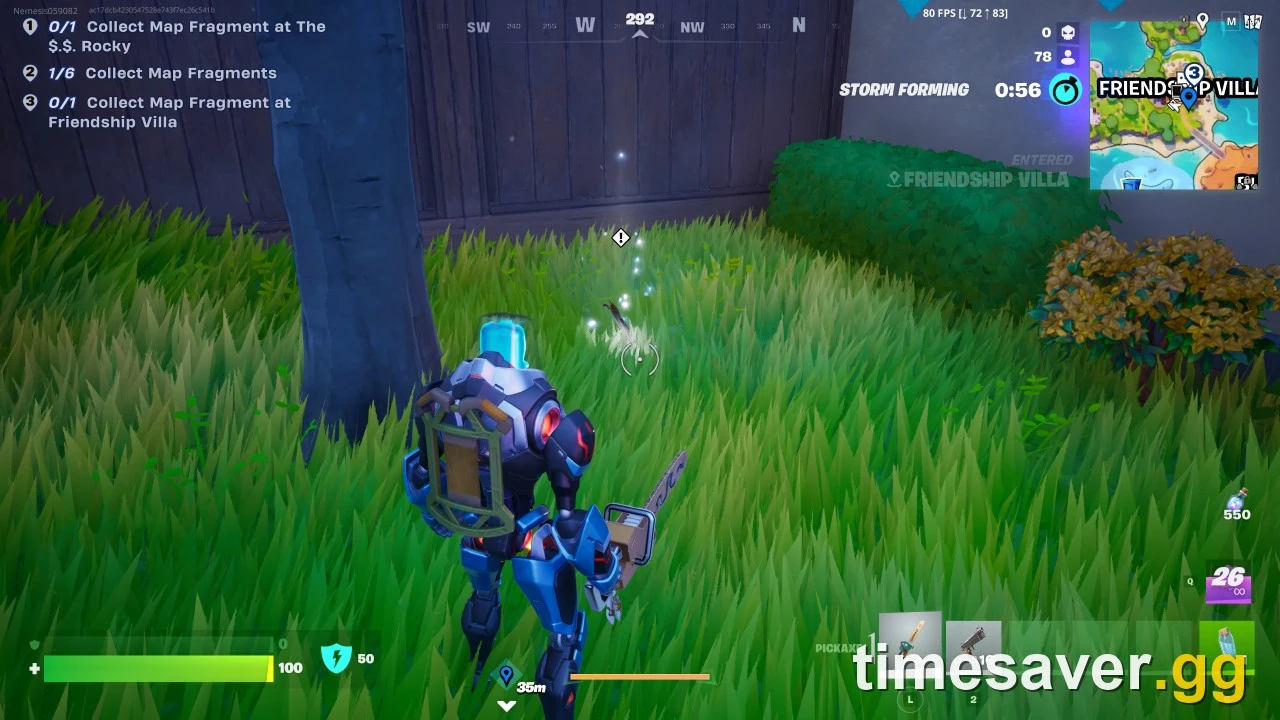
Before pickup: the grass, wooden fence, bushes and white diamond identify the spot. The pictured 0/1 and 1/6 belong to this player. Pickup screenshot: Epic Games, via TimeSaver. Select to enlarge; use Back to return to this step. Can’t complete this step?
If no prompt appears, step closer and look at the ground. Follow the prompt on your own screen until the action completes.
Confirm the objective, then tick Piece 3
Open Quests and check Collect Map Fragment at Friendship Villa. Once it shows as complete, go back to the website and tick Piece 3 on the checklist yourself.
- Look for
- The named objective Collect Map Fragment at Friendship Villa marked complete in your Quests.
- Check before continuing
- Your own Quests show that objective as complete. Then tick Piece 3 on the site.
Can’t complete this step?
If Collect Map Fragment at Friendship Villa is not complete, recheck the pickup. Leave Piece 3 unticked on the site until it is.
Step 1: TimeSaver · map and pickup images. Steps 2–4: Destructoid · tree opposite Crusty Cod · The Click · ground pickup and quest credit. Additional sources: Epic · third-fragment arrival. Sources checked 16 November 2026. Epic’s arrival announcement and the tree-level walkthrough describe different parts of this task.
Check my Piece 3 recordRead your completed Friendship Villa objective, then check Piece 3 to save your manual record.
MAP FRAGMENT
QUEST & REWARD.
The collection target is six Map Fragments. Use the checklist above to record your Adventure quest results.
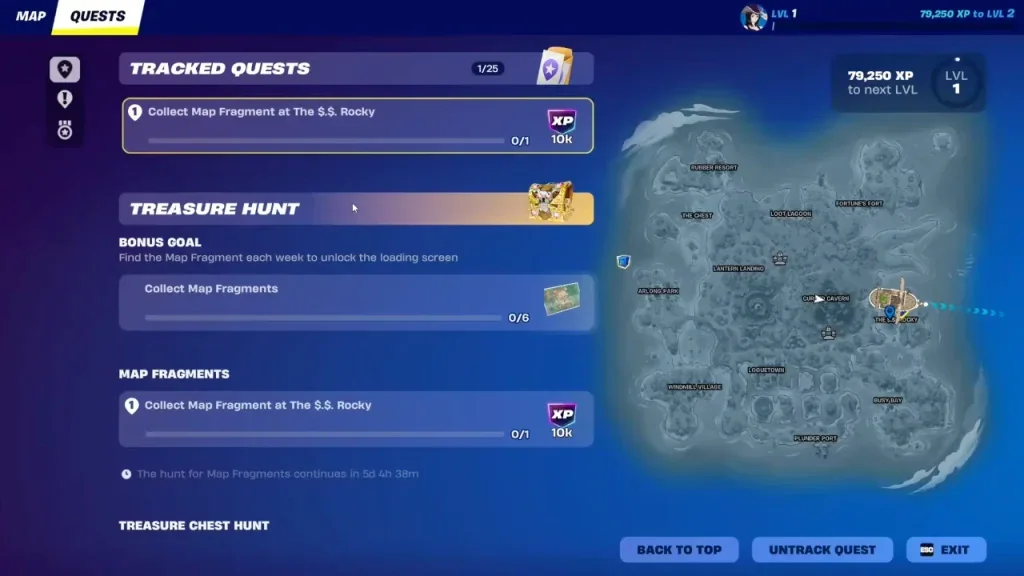
Example: two checked pieces
After the game credits the ship and shack pickups, mark pieces 1 and 2. Your note reads 2/6, with 4 not recorded. Use the current quest list for the remaining pieces.
Export checklist JSON to keep a restorable file. On another browser, choose that file, review the six marks and confirm replacement. Copy my progress also gives you a text note.
The six-piece reward
The reviewed collection guides name the X Marks the Zero Point Sliver loading screen. Check the reward shown on your current quest track and verify it on the same account after completion.
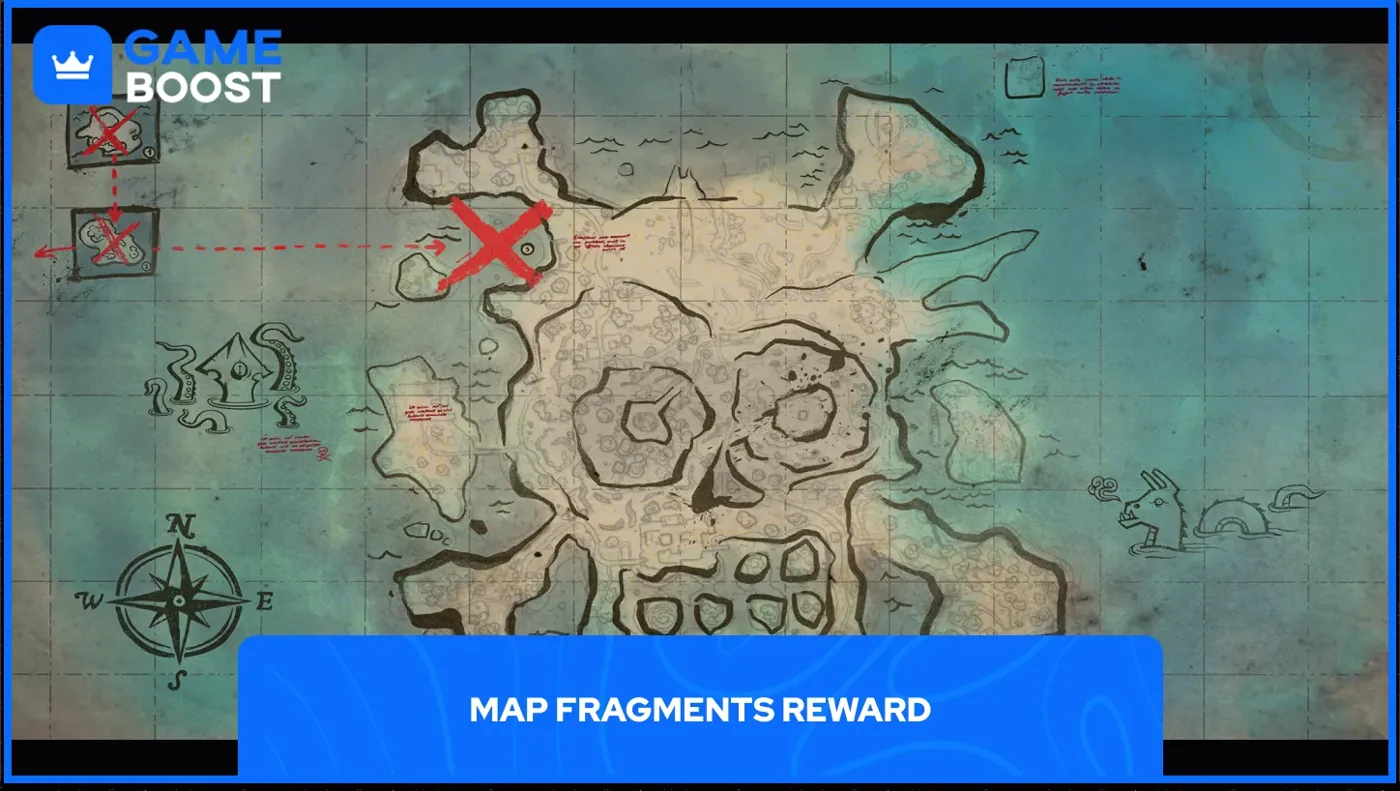
Reward and menu workflow: GAMES.GG. The Captain X outfit, random chest treasure and Pirate Shop Access use other tasks. Compare the reward paths.
MISSING MAP
FRAGMENTS?
- No floor pickup
- Recheck the ship’s level or the Stronghold’s outer shack. Read your completed and available quests before repeating the route; the item can already be credited.
- A later piece is missing
- The three routes cover the ship, Stronghold shack and Friendship Villa tree. Check Treasure → Adventure and Quests for the next available objective. On 19 November, pickup locations for Pieces 4–6 were still unverified. Oscar’s announced 22 November arrival is the next Captain’s Day to check in Fortnite.
- The browser says 0/6
- Update this checklist using the results shown in Fortnite. Restore a checklist JSON through the preview above, recheck known pieces yourself, or use your copied note.
- Storage is blocked
- Use the checklist in this tab and export JSON or copy a note before leaving. Clearing site data or private browsing can remove the saved marks. Read the storage explanation.
Follow the missing piece
Choose the illustrated route for Piece 1, 2 or 3 above. Check the ship’s floor, the Stronghold shack or the Friendship Villa tree, then record the matching piece after quest credit appears.